• Skip to primary navigation
  • Skip to main content
  • Skip to primary sidebar

Appliance. net

Appliance news, reviews, ratings, forums, reports and buyers guides.
Locate repairs and parts. for home and kitchen appliances.

  • About Appliance.Net
    • BestPrice Family
    • Contact
    • Become a Featured Dealer
    • Retailer & Repair Services Advertising
  • Shopping
  • Appliance Forum
  • Manufacturers
    • Manufacturers 800 Numbers
    • Aga
    • Bosch
    • Caldera
    • Dacor – The Life of the Kitchen
    • General Electric – GE
    • Jenn Air
    • Sears – Kenmore
    • Thermadore
  • Sections
    • Features
    • News
    • Recalls
    • Kitchen
      • Dishwasher
      • Ranges Ovens and Cooktops
      • Refrigerators and Freezers
      • Microwave Oven
    • Household
      • Consumer Electronics
      • Heating and Cooling
      • Vacuum Cleaners
    • Laundry
      • Washing Machine
      • Dryers
    • Safety
You are here: Home / Archives for Parts/Repairs

Parts/Repairs

Basic Appliance Care and Safety

May 14, 2008 By NightOwl

If you are lucky, you rarely need to pay much attention to the appliances that run, some of them 24 hours a day, in your home. But to keep everything trouble free, it’s good to follow some basic guidelines for care and safety when using or installing appliances in your home. Handymanclub.com offers some simples steps for use with your washer, dryer, refrigerator, ranges, cooktops, even your water heater.

Ventilation and combustion (dryers, water heaters, ranges and cooktops)
• Clean the clothes dryer’s lint filter before or after each load. Check behind the dryer for trapped lint. Clear lint from the exterior vent often. Lint buildup results in inefficiency and excessive wear and can even pose a fire hazard. According to the Consumer Product Safety Commission (CPSC), an estimated 15,500 fires each year are associated with clothes dryers.
• Use only metal ducting for gas dryers because they run hotter than electric machines. Rigid rather than accordion-pleated ducting is best for airflow.
• Never vent clothes dryers or water heaters into the house to supplement heating.

Plumbing (washers, refrigerators and water heaters)
• To prevent leaky or bursting waterlines, check washing machine hoses for signs of wear. Consider replacing rubber hoses with newer braided stainless steel hoses.
• Check the screens at either end of the water hoses and remove sediment that may have collected there. This is especially important after road construction or water-main work has been done in your area.
• Periodically check that the washing machine is soundly footed and level so the hoses and the drain hose do not come loose.
• If a dishwasher’s tub doesn’t empty after operation, detach the drain line from the household drain and clean any debris from the line.

Gas (dryers, ranges and water heaters)
• Never use an oven as a room heater — combustion pollutants resulting from fuel-burning appliances can cause illness or death. Have gas appliances serviced periodically to ensure they burn with the proper mix of air and fuel.
• Be sure all vented appliances are checked for backdrafting. (This is one reason that it’s important for a city building official to inspect newly installed vented appliances.)

Electric
• Diehard DIYers may bristle at this warning from the CPSC — nonetheless, it’s a lifesaver. Never attempt to repair a microwave oven — because they use high-voltage power, they can pose a risk of electrical shock even after they are disconnected from the power source.
• Use dedicated circuits for large appliances such as washers and dryers.
• Keep appliance cords away from hot surfaces.

Filed Under: Dishwasher, Dryers, Features, Gas Range, Heating and Cooling, Household, Kitchen, Laundry, Microwave Oven, Oven, Parts/Repairs, Ranges Ovens and Cooktops, Refrigerators and Freezers, Safety, Washing Machine, _ Tips Tagged With: appliance, appliance safety, appliance tips, appliances, basic appliance safety, dryer, dryer safety, electrical, installation tips, microwave, Microwave Oven, microwave safety, Oven, range, range safety, refrigerator tips, washer, washer safety, water heater

Inside a Washing Machine

March 28, 2008 By NightOwl

We don’t often consider how our household appliances work, we tend to take them for granted.  But when I stop to think about all they do, I wonder about the mechanics of it all.  The site howstuffworks.com is so much fun. It has a wonderful way of explaining how our everyday world works.  Below is an excerpt from the section about the workings of a washing machine, you can read the whole article here.

If we take a look under the washing machine, you’ll see what makes it so heavy.


Motor and counterweight

Yes, that is in fact a block of concrete in the picture above. The concrete is there to balance the equally heavy electric motor, which drives a very heavy gearbox that is attached to the steel inner tub. There are lots of heavy components in a washing machine.

The washing machine has two steel tubs. The inner tub is the one that holds the clothes. It has an agitator in the middle of it, and the sides are perforated with holes so that when the tub spins, the water can leave.

The outer tub, which seals in all the water, is bolted to the body of the washer. Because the inner tub vibrates and shakes during the wash cycle, it has to be mounted in a way that lets it move around without banging into other parts of the machine.

The inner tub is attached to the gearbox, which is attached to the black metal frame you see in the picture above. This frame holds the motor, gearbox and the concrete weight.


Cable-and-pulley support system

The picture above shows just the black metal frame, without the tub or gearbox. The cable that you see on the left side of the picture is the other end of the same cable that you see on the right side. There are a total of three pulleys, so that if one side of the frame moves up, the other side moves down. This system supports the weight of the heavy components, letting them move in such a way as not to shake the entire machine.

But, if all of these parts are just hanging by cables, why don’t they swing around all the time?

A laundry machine has a damping system that uses friction to absorb some of the force from the vibrations.


Vibration-damping system

In each of the four corners of the machine is a mechanism that works a little like a disc brake. The part attached to the washer frame is a spring. It squeezes two pads against the metal plate that is attached to the black frame. You can see where the pads have polished the plate from movement during vibration.

Filed Under: Features, Laundry, Parts/Repairs, Washing Machine Tagged With: how a washing machine works, Washing Machine

Appliance Maintenance Tips and Lifespan Estimates

March 27, 2008 By NightOwl

I think it’s good to be reminded regularly to look after these appliances we spent so much to acquire.  So I feel justified in offering this list from the Sun Herald that nudges you to take a minute and check up on your household appliances. It could add years to their lifespan.

Refrigerator

Average life span: 14 years

What you need to do: Locate the condenser coils by checking your owner’s manual. Clean them by unplugging the fridge and removing dust gently with a broom or brush. Check the seals by sliding a piece of paper in the closed door. If it falls out, you need to replace your seals. And defrosting regularly can’t hurt.

Inspected and cleaned: Have it done if your at-home remedies don’t work or if there are noises you can’t locate.

Washer, dryer

Average life span: Washer: 12 years; Dryer: 14 years

What to do: Clean the dryer’s lint filter and hoses. Kinks or ridges can cause highly flammable lint to build up, a major cause of fire.

Inspected and cleaned: Replace the hoses on your washing machine every 3 to 5 years.

Window air conditioner

Average life span: 13 years

What you need to do: Changing the air filter every month helps the system run more efficiently and improves air quality. Dirt and neglect are the main causes of AC failures, so clean it well.

Inspected and cleaned: Do it twice a year, usually fall and spring.

Garbage disposal

Average life span: 13 years

What you need to do: Keep anything stringy, like pumpkin pulp, out of it. Also leave out tough produce, anything hard that can dull the blades, and grease, which can clog your pipes.

Inspected and cleaned: Have this looked at whenever your plumbing is checked.

Microwave

Average life span: 5 to 8 years

What you need to do: Microwaves are simple appliances; they don’t know the difference between the food you want cooked and old splatters in the chamber, so keep it clean and don’t exceed the recommended usage.

Inspected and cleaned: Anytime there’s a problem. You should never attempt to work on it yourself.

Dishwasher

Average life span: 9 to 12 years

What you need to do: Be mindful of what you put in it. Leave out small pieces that can get lodged in the drain and make sure everything is dishwasher-safe. Use a powdered detergent, because gels can cloud dispenser and glasswear. Spend the few dollars on a rinse aid, such as Jet-Dry, every month or so.

Inspected and cleaned: Every 2 to 3 years.

Water heater

Average life span: electric: 6 to 14 years; gas: 5 to 9 years

What you need to do: Check your hoses, fittings and release valves. Also watch for damaged areas on the outside of the tank and leaking.

Inspected and cleaned: Every couple of years.

Stove

Average life span: electric, 16 years; gas, 19 years

What you need to do: Check temperature with a thermometer or by following a basic white cake mix and making sure it cooks correctly. Keep it clean inside and out, using nonabrasive cleaners. Check your seals and the hinges, which can bend over time and let heat escape.

Inspected and cleaned: Any time it’s not heating properly.

Central air system

Average life span: 10 to 20 years

What you need to do: Check for leaks around the system and with hose connections. You should also change your filter monthly.

Inspect and cleaned: Seasonally

Filed Under: Dishwasher, Dryers, Features, Gas Range, Heating and Cooling, Household, Kitchen, Laundry, Parts/Repairs, Refrigerators and Freezers, Washing Machine, _ Tips Tagged With: appliance lifespan, appliance maintenance, dryer maintenance, refrigerator maintenance, washer maintenance

Black & Decker In- Car Charger

March 5, 2008 By NightOwl

Having a dead battery is never fun. Having one late at night or in the freezing snow is bad. How about late at night and in the freezing snow? Okay- enough! Dead batteries happen, but being prepared can make the situation easier.

Black & Decker has a gadget called Simple Start that can jump start a car with you not even having to get out of it. Plug the charger into your cigarette lighter and in about ten minutes, you’re good to go. To be sure it is always ready, recharge the starter once a month through your car’s cigarette lighter, or an electrical outlet.

The Simple Start also has a built in LED light and a 12 volt DC charging port for charging cell phones.

I’ve found the Simple Start online for about $40.

Filed Under: Features, Garage and Garden, Parts/Repairs Tagged With: Black & Decker, Black & Decker car charger, Black & Decker in-car charger, Black & Decker Simple Start, Simple Start

Bright Lights, Bad Headaches?

February 5, 2008 By NightOwl

This may stretch the appliance theme a bit, but since so many of us are switching to compact fluorescent light bulbs to save energy, I think it is worth sharing. According to Dr. Isadore Rosenfeld at Parade Magazine, new research suggests some dangers:

Flickering bulbs have been reported to precipitate migraines or even seizures, though manufacturers say the new models have been improved. Fluorescent light can also aggravate skin rashes in people with lupus, eczema, dermatitis or porphyria.

Perhaps most important, the bulbs contain mercury.  If one breaks, don’t vacuum the debris- that can release toxic dust into the air.  Leave the room for 15 minutes.  Then, wearing gloves, place the fragments into a plastic bag, seal it and take it to a recycling center.

Filed Under: Household, Office, Parts/Repairs, Safety, _ Tips Tagged With: compact fluorescent, compact fluorescent bulbs, fluorescent bulbs, fluorescent lights

Repairing a Toaster or Toaster Oven

February 4, 2008 By NightOwl

If you haven’t read our article on How Toasters and Toaster Ovens Work, you might want to do that before you start any repairs. If you feel ready to tackle a smallish job like this, then read on…

How to Repair a Toaster

In many homes, toasters malfunction more than any other small appliance. There are two reasons for this. First, toasters are typically built economically to be a throw-away appliance. Replacement models start at $10.

Second, malfunctions are frequently not the fault of the toaster itself but of food particles that interfere with its operation. Excess pieces of bread broken off by carriage movement fall into the base of the toaster and accumulate, obstructing carriage movement, shorting out heating elements, plugging the latch release, and interfering with solenoid operation.

That’s why most pop-up toasters have a large crumb tray and door at the bottom of the toaster. By sliding or unlatching this crumb door you can release food particles trapped in the bottom of the toaster.

For a toaster that is used daily, this should be done once a week. Simply unplug the toaster, hold it over a trash container, and unlatch the door. Once the primary food particles have fallen out, move the toaster around to release other particles that may be trapped at the edges. Periodically clean out the toaster using a can of compressed air, making sure you don’t damage sensitive heating elements or switches.

How to Repair a Toaster Oven

Toaster ovens operate much like toasters. However, a toaster oven is more complex and is typically more expensive to purchase. The higher cost means that repairs are easier to justify. You will probably think twice before tossing a $75 toaster oven into the recycle bin. And because toaster ovens are less compact, they are often easier to work on than pop-up toasters.

Some toaster ovens simply toast bread and related food products horizontally rather than vertically as with pop-up toasters. Other toaster ovens are actually miniature ovens. The differences are identified by the wattage used — broilers require more watts of electrical power to operate — and by the controls. Some toaster ovens allow you to bake and broil foods, offering precise temperature and function control.

Typical toaster oven repairs include servicing the main switch, the thermal fuse, the heating element, and the solenoid.Servicing the Main Switch: The toaster oven’s main switch is an important operating part, one that gets extensive use and is a frequent culprit when things go wrong. In many cases, all that’s required is cleaning the switch. In others, the switch must be replaced. To access and replace the main switch:

Step 1: Remove the side panel and, if necessary, the power cord.

Step 2:Check the contact points for pitting or discoloration. If they are not making good contact, carefully rub them with very fine sandpaper, then clean them with an electrical contact cleaner spray or isopropyl alcohol on the end of a cotton swab. Be careful not to bend the contact leaves out of alignment.

Step 3: If the contacts are fused or the leaves broken, remove and replace the main switch. Main switches are fastened to the chassis with clips, screws, or rivets.Servicing the Thermal Fuse: A thermal fuse protects the toaster oven’s main switch from damage caused by an electrical overload. If the main switch doesn’t work, check the thermal fuse using a continuity tester or multitester. The thermal fuse should show continuity rather than an open circuit. If defective, remove and replace the thermal fuse with one of identical rating. In most models, this means cutting the fuse leads or wires and replacing the fuse unit.Some toaster ovens use a bimetallic thermostat or thermal cutout to protect the adjacent main switch from damage. Inspect the thermal cutout for debris, distortion, or discoloration. Clean debris away with a can of compressed air. As needed, clean the contact points with emery paper.Servicing Heating Elements: A heating element is vital to your toaster oven. It may only be on for a few minutes to toast bread, or, in the case of a baking/broiling unit, it may be on for an hour or more at a time. A heating element is simply a high resistance wire that glows as electricity flows through it. Heating elements, then, are easy to test. Here’s how:Step 1:Determine whether or not there is a clear path for electric current by touching a continuity tester or multitester probe to each end of the element.Step 2: If there is no clear path, remove the heating element. Removing an element may be as easy as unscrewing both ends and any support brackets; however, it may also require that rivets be removed and replaced. Your decision to replace a defective element will then depend on how easy it is to remove as well as the value of the toaster oven.

The two dark rods along the base of this toaster are the heating elements.
©2006 Publications International, Ltd.
The two dark rods along the base of this toaster are the heating elements.

Step 3: Once the heating element has been removed, replace it with one of identical rating and structure. Be very careful not to distort the shape of the new element as it is installed. Element wires are fragile and can be damaged easily. Higher-wattage elements are of thicker wire, much like the element in your conventional oven.

Servicing a Solenoid: The solenoid turns the electric current to the heating elements on and off. If the heating elements stay on longer than they should and burn your food, or if opening the appliance door turns them off, the solenoid may be defective. To test and replace a solenoid:Step 1: Look at the unit for visible damage and smell the area around the solenoid for obvious damage to components.Step 2: Use a continuity tester or multitester to verify your findings.Step 3: Replace the solenoid. In some units, this is easy. Simply unscrew the brackets and remove the unit. If replacing the unit requires cutting or desoldering, take the unit to an appliance-repair shop for service.So, now you are prepared next time your toaster goes on the fritz and you want to impress your schoolager with your knowledge of small appliances. If you would like to learn more, you can visit howstuffworks.com

Filed Under: Features, Kitchen, Parts/Repairs, Small Appliances, _ Tips Tagged With: how to repair a toaster, how to repair a toaster oven, repairing a toaster, repairing a toaster oven, toaster, toaster oven, toaster repair

How a TV Works

December 25, 2007 By NightOwl

If you have ever wondered how your television works, HowStuffWorks has just what you are looking for. They cover the basic technology in the back of your TV: the four parts, electron gun, steering coils, phosphorus screen, and steering coil. It’s so much easier to understand if you watch the video.


Filed Under: Consumer Electronics, Multimedia, Parts/Repairs, Video

Finding Your Inner Guide – or at Least a PDF Manual

December 13, 2007 By WorkinMan

I recently overhead someone ask a friend: ‘how did we ever find out anything before Google?’. I gave away my internet age when I said “with altavista” and added for good measure – in a gopher guide. But nevertheless, the point stands. Google is just the greatest mindshare search tool, but its just a gateway into the riches of the internet. One of the great killer aps of customer service is the ability of any manufacturer to make all of their manuals available instantly to their customers.

att_logo.jpgMy ATT answering machine phone is acting weird, and my wife asked me to find the manual. After 10 minutes of wasting my time in paper files, I just did a quick search and came up with this page listing dozens of PDF manuals to various AT&T phones.

One of our goals here is to create a single point resource with as many manuals as we can hunt down. So here’s a start.

  • 1150/1450 Manual – 2.4 GHz Cordless Speakerphone
  • 1160/1440 Manual – 2.4 Ghz Cordless Telephone
  • 1177 Manual – 2.4 GHz Cordless Speakerphone/Answering System with Caller Id/Call Waiting
  • 1177 Spanish Manual – 2.4 GHz Cordless Speakerphone/Answering System with Caller Id/Call Waiting
  • 1231 Spanish Manual – 2.4 GHz Dual Handset System
  • [Read more…] about Finding Your Inner Guide – or at Least a PDF Manual

Filed Under: Consumer Electronics, Household, Manuals, News, Parts/Repairs, Small Appliances, _ Tips

You Probably Don’t Need That Extended Warranty

November 9, 2007 By NightOwl

Straight from PR Newswire: J.D. Power and Associates Reports: High Reliability of Major Home Appliances May Reduce Need for Extended Warranties

According to J.D. Powers and Associates 2007 Major Home Appliance Study, most major appliances these days are quite reliable, yet many consumers continue to purchase extended warranties.

The study measures customer satisfaction in nine segments of major home appliances: dishwashers; free-standing ranges; built-in cook-tops and wall ovens; freezer-on-top style refrigerators; side-by-side and French door-style refrigerators; clothes washers; clothes dryers; over-the-range microwave ovens; and counter-top microwave ovens. The study, now in its third year, examines customer satisfaction with microwave ovens for the first time. Customer satisfaction is measured based on performance in six factors: operational performance (including how well the appliance functions, noise level and energy efficiency); operational features (such as the number of settings available and appliance capacity); ease of use; styling and feel; price; and warranty.

The study finds that during the first two years of ownership, approximately one in 10 consumers report some kind of problem with their major appliance. However, many of these problems can be resolved by following instructions in the owner’s manual or on the manufacturer’s Web site. Relatively few problems actually require a service visit.

Despite this high degree of reliability, many consumers purchase an extended warranty for their appliances. Among owners of refrigerators, stoves, dishwashers and laundry appliances, approximately 25 percent report purchasing an extended warranty, while approximately 15 percent of microwave oven owners do so.

“Extended warranties certainly provide a degree of peace of mind,” said Dale Haines, senior director of the real estate and construction industries practice at J.D. Power and Associates. “With some appliances — particularly those with complex electronics and potentially high repair costs — purchasing an extended warranty may make sense. However, major appliances tend to be very reliable, and consumers should consider very carefully — depending upon their circumstances — whether an extended warranty is worth the additional cost.”

In satisfying customers with major kitchen and laundry appliances, Bosch, GE Appliances, Kenmore, LG, Maytag, Samsung, Whirlpool and Whirlpool Gold rank highest in various segments.

“Particularly strong performers include Bosch, LG and Samsung, which have achieved consistently high satisfaction levels in consecutive years,” said Dale Haines, senior director of the real estate and construction industries practice at J.D. Power and Associates. “For two consecutive years, Bosch has ranked highest in the dishwashers segment and LG has ranked highest among clothes washers, while Samsung has earned an award in a refrigerator segment for three consecutive years. This is especially impressive considering the high levels of quality and reliability that many appliance manufacturers attain.”

The 2007 Major Home Appliance Study is based on 22,637 responses from consumers who purchased one or more new major home appliances through a retail store, their new-home builder, or received one through other means (such as a gift) during the previous 24 months.

Filed Under: Dishwasher, Gas Range, Household, Kitchen, Laundry, Microwave Oven, News, Oven, Parts/Repairs, Ranges Ovens and Cooktops, Refrigerators and Freezers, Washing Machine, _ Tips

Can KitchenAid Stand up to the Grind?

July 23, 2007 By NightOwl

One of the easiest ways I have found to get calcium and vitamins into my kids is to offer them smoothies as an after school snack.I just throw a variety of frozen fruit, yogurt and some milk into the blender and produce a treat they love. This is a great time of year to pull out the blender and make a cool treat.

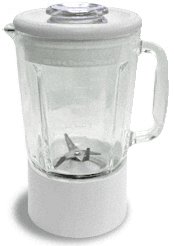
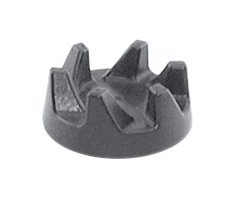
I have been doing this for years using a Hamilton Beach blender I purchased on sale at a local drugstore almost twenty years ago. Now we have a problem. kitchenaid-blender.gifAbout five years ago, my husband bought me a Kitchenaid blender that claims to be strong enough to crush ice at all speeds, but after years of occasional use, the coupler started breaking apart.The coupler is that small black gear-like circle that connects the blender jar and blades to the base. It has broken in two stages. The first time, when two pieces broke off, I called Kitchenaid customer service. The representative there was friendly and sympathetic, but as our blender was out of warranty, she offered no advice other than that we could continue to use the blender as it was although, it would add a slight strain to the motor and therefore shorten the lifespan of the appliance somewhat.

kitchenaid-blender-drive-coupling.gif

So, we continued using the blender for the next few months.Yesterday, two more pieces of coupler broke off.I have sent the base to be repaired at an authorized repair shop at a cost of $25. This is not a huge cost, but as a percentage of an $80 blender, it seems high considering how often (or not, really) we used it. I just think a blender that claims to be an ice crushing, high powered appliance, made by a quality manufacturer should be more durable.

Filed Under: Consumer Electronics, Cooking, Household, Kitchen, News, Parts/Repairs, Reviews, _ Tips

  • « Go to Previous Page
  • Go to page 1
  • Go to page 2
  • Go to page 3
  • Go to page 4
  • Go to Next Page »

Primary Sidebar

[footer_backtotop]

© 2006-2019 Appliance.net · Log in